BLAKE2b Bitcoin (XBT) mining for compatible original Goldshell KD BOX hardware. A guided installer. A redesigned control dashboard. Built for daily operation.
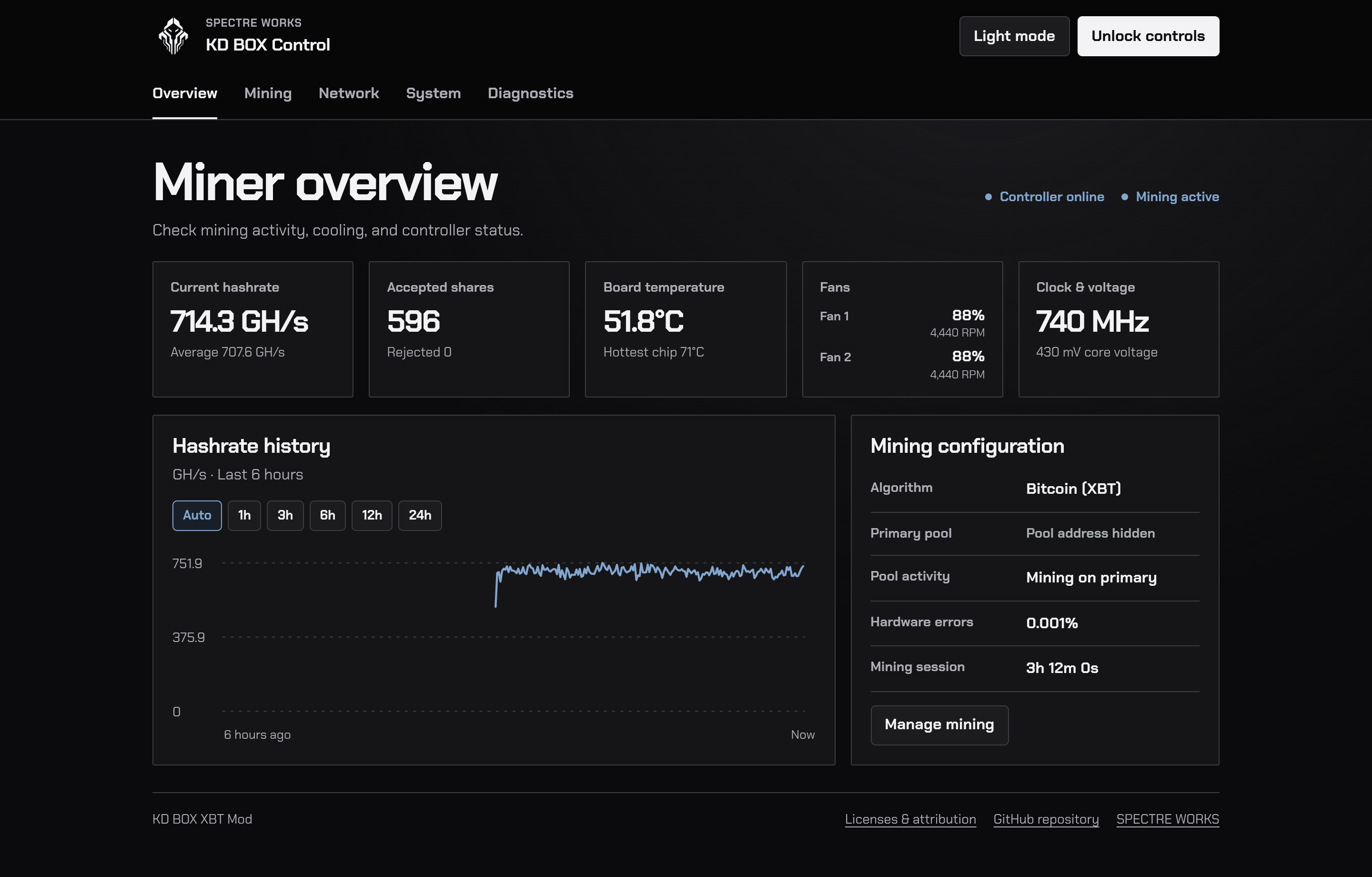
Live interface captured from one KD BOX. Pool details hidden. Readings describe that moment on that unit; they are not a benchmark guarantee. Select image to enlarge.
/// Daily operation
From pool setup to thermal control.
One dashboard for the details that matter.
01 / MINING
Your pools. Your payout.
Manage the primary pool and ordered backups, set your own payout or worker details, and select Bitcoin (XBT). KDA selection remains available.
02 / MONITORING
See what the miner is doing.
Track live and average hashrate, accepted and rejected shares, chip temperatures, both fans, and mining session time. Review hashrate history and diagnostics.
03 / COOLING
Automatic, with limits.
Cooling follows the hottest chip. Optional Automatic performance uses full fan speed and adjusts clock within the unit’s qualified ceiling. Thermal and watchdog protections remain active; gains are not guaranteed.
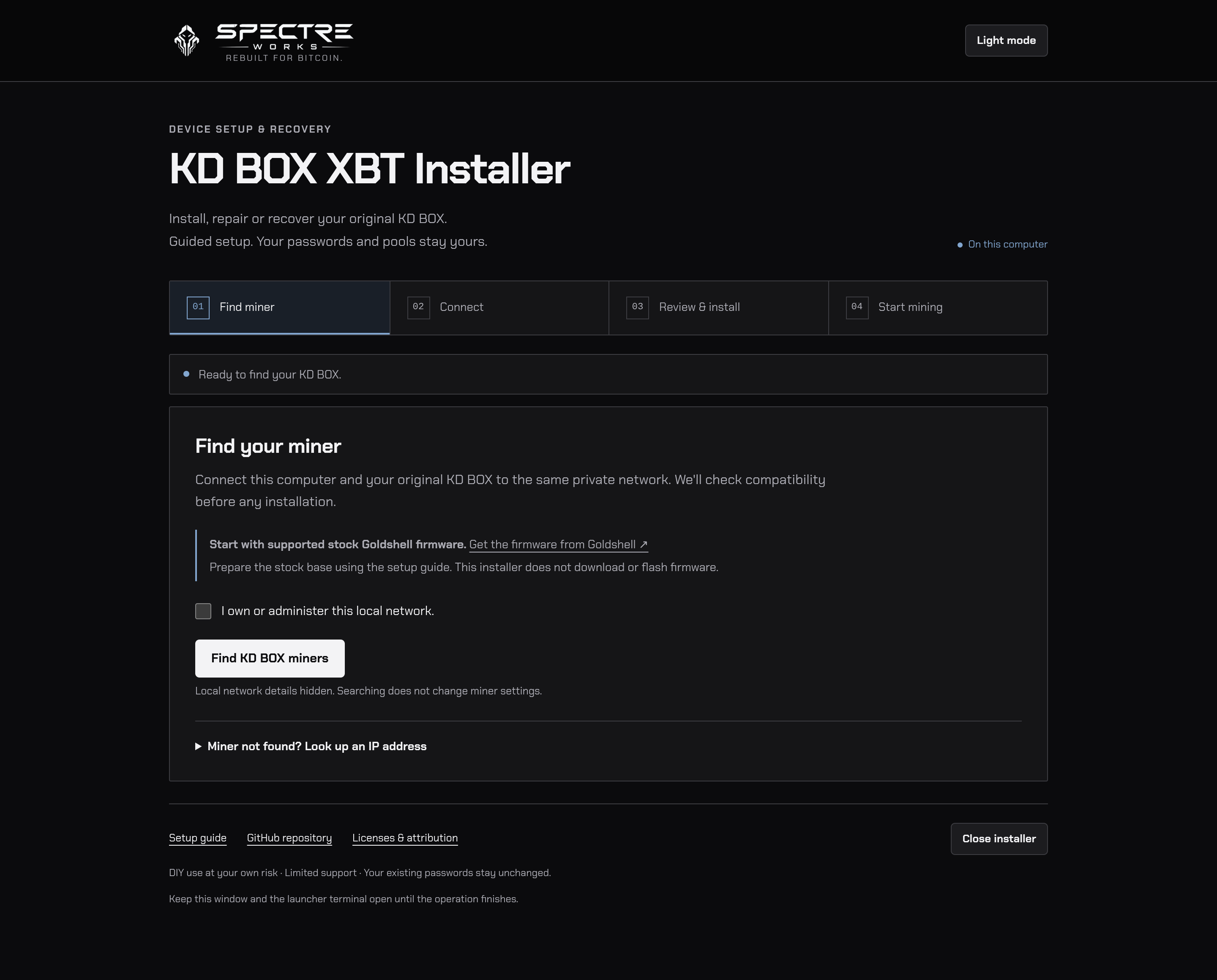
The guided installer runs on your computer. Local network details hidden. Select image to enlarge.
/// Guided setup
Find. Verify. Install.
Windows · macOS · Linux
The cross-platform launcher opens a local browser interface. It checks the miner’s model, firmware, architecture, credentials, and storage before offering installation.
A verified private recovery snapshot is saved before application writes. Your existing passwords and pool settings stay yours.
This is an SSH application modification using the mining engine already on the device. It is not a complete firmware image; obtain the required stock firmware separately from Goldshell.
Original Goldshell KD BOX, board MCB_V5_4, ARMv7. KD BOX II, Pro, and other models are not supported.
Stock firmware
A supported stock Goldshell firmware base is required. Check the current compatibility and firmware preparation guide before installation; other firmware may be incompatible. The installer does not download or flash Goldshell firmware. Firmware preparation ↗
Computer
Windows (x64 or ARM64), macOS (Intel or Apple silicon), or Linux (x64 or ARM64 with glibc). A modern graphical browser and Internet access for first-time tool setup are required. Platform details ↗
Network & pool
Access to the miner’s trusted private LAN, your current dashboard password, an XBT-compatible pool, and your own payout / worker details. Keep the miner’s management ports off the public Internet.
First run
Reliable power, unobstructed cooling, and physical access to supervise startup. Confirm fan operation, temperatures, hashrate, accepted shares, and activity at your pool.
/// Official distribution
Get KD BOX XBT Mod.
Free & Open Source. Download the prepared installer ZIP and its checksum file from the latest official release, verify the checksum, and extract the entire ZIP before starting.
GitHub’s automatic “Source code” archives do not include the built controller. Use the prepared installer package and follow the release instructions.